Neon Pier: a digital birthday invitation theme
Neon Pier is a theme for the card you already have. Upload your invitation and it sits inside Neon Pier's backdrop, drawn around neon, boardwalk, pier, ferris wheel, with RSVP, directions, a countdown and a wishes wall added around it. Made for kids parties, first birthdays and milestone birthdays.

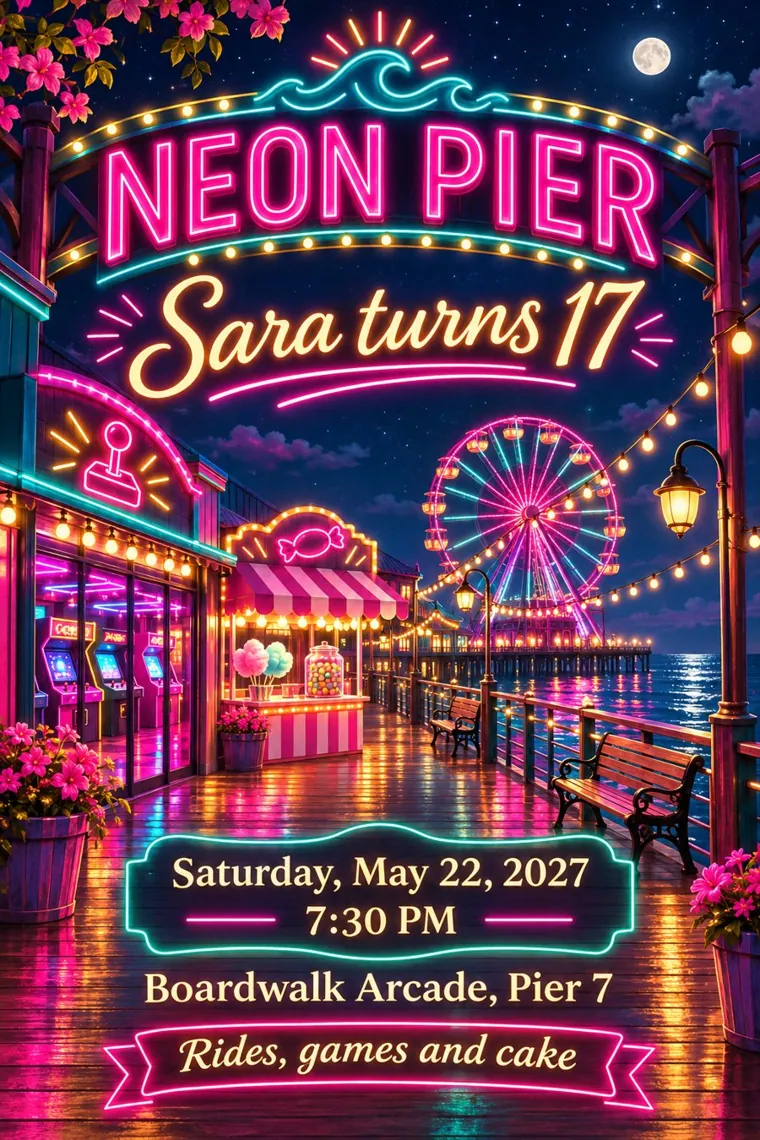
What your guests get with Neon Pier
Guests reply on the page, and you see who is coming and how many.
A Google Maps link from your venue, so nobody has to ask where it is.
The date stays in their calendar, with a countdown to the day.
Guests leave wishes and share photos on the same page.
Tap to call the host or a family member, with the numbers you choose.
Send one link instead of a flat picture, and edit details later without a new link.
How to use Neon Pier in three steps
- Upload the invitation you already have: a JPG, PNG, WebP, HEIC or a short video.
- Check the date, time and venue we read from it, then pick Neon Pier and a color.
- Preview the page, publish, and send one link on WhatsApp.
Questions about Neon Pier
Can I use my own card with the Neon Pier theme?
Yes. Upload the invitation you already have, from Canva, a designer or a photo of a printed card. Your card stays exactly as it is, and Neon Pier becomes the page around it.
Is Neon Pier a good choice for a birthday party?
It was made for kids parties, first birthdays and milestone birthdays, with a look built from neon, boardwalk, pier, ferris wheel. You can preview it with your own card before you publish, and switch to another theme at any time.
What does my guest page include?
RSVP with headcounts, Google Maps directions, a countdown, add to calendar, call buttons, a wishes wall, a photo wall and a gallery, all on one link you send on WhatsApp.
Will the theme change my invitation card?
No. The theme only changes the backdrop, colors and motion around your card. The card image is never edited or cropped.
Birthday invitation templates collects every birthday template in one place.